Saturday, November 25, 2006

Bear with me...


Hi, everyone. I hope you all had a great Thanksgiving!

I want you to know that I haven’t forgotten to come out of my cave and share with you the recommendations/ideas that I have re: your China unit. I have been drafting a blog entry that will speak to what I’ve heard you all tell me, offer ideas for integrating the technologies we’ve dabbled with, and share suggestions for maximizing our very limited time together.

I have done some research on the internet, found and contacted an expert in the field of integrating SMARTboards, and come up with my own ideas for you. I will share that with you via the blog before the weekend is over.

I felt that the session the other day was clunky and rushed, and one of the things I would like to do is figure out a way to “train” you on the SMARTboard a more comprehensive way. Obviously, a deep training of this sort will take more time, and your China unit will be a thing of the past by the time we can set something like this up. We'll see what we can do....

I am also aware that some of you may be forming your own ideas about what you would like to do. If you are (and even if those ideas are not completely formed yet), I encourage you to share them via the blog. Also...perhaps at this point, it might be beneficial for me to meet with each of you individually a few times.

So....this post is mainly for me to say, Bear with me! I will be posting again soon!

Wednesday, November 22, 2006

China Links

I wanted to post an entry where we can "grow" a list of China Internet Resources. I'll be curious to see if you can add to this list, too.

Sunday, November 19, 2006

How to Share Blog Posts

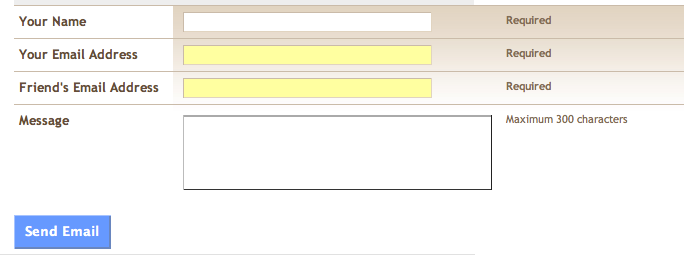
Brelle wanted to know how she could forward the Whiteboards blog post to some other teachers in the lower school. Here's how you do it. At the bottom of every post, there is a tiny envelope icon with a black arrow on top of it


Click on this icon, and the following window will pop up:


Just fill out the form and click "Send Email." That's all there is to it!

Thursday, November 16, 2006

If you like maps, digital photography, and sharing with others, you might like....


For those of you interested in Google Earth, you might also be interested in taking a peek at this new Web 2.0 tool called Everytrail. EveryTrail is an online platform that enables you to visualize your travel and outdoor activities and share these with likeminded people from all over the world. With EveryTrail you can easily upload GPS data you recorded while out on the trail and add your photos and notes, to create a visual record of your outdoor activity.

Check out this person's hike through ZhangJiaJie Park in China.

Wednesday, November 15, 2006

Wanna Be My Buddy?

Hi! I had this idea yesterday after working with Robby S. and Dianne G. Have you all ever used iChat (see icon above)? It's an instant messaging tool (that can also allow you to incorporate audio and video). I have never used instant messaging as a way of connecting with the teachers with whom I work, and I would love to test it out with you all if you're open to it. If you are interested in trying it out with me, here's what you need to do:
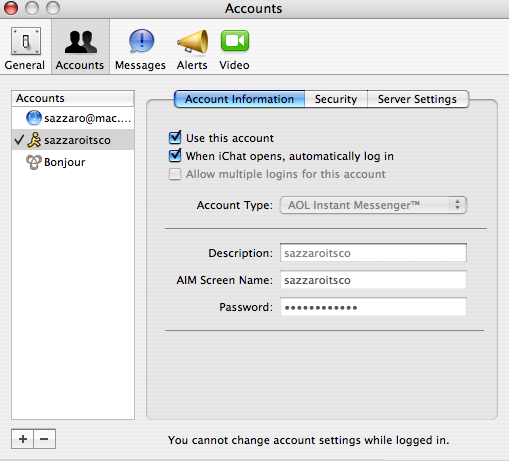
  1. First, you have to set up what's called an AIM account, which will, in short, just give you a screen name and password to plug in to iChat. Click here to set yourself up with this. Be sure to write down user names, passwords, screen names, etc.
  2. After you go through this process, you will need to open iChat on your computer, and walk through the little wizard that gets you set up. I think you will come to a screen that looks like the pic below. Here's where you type in the AIM info.
  3. After you go through this process, you will probably see your Buddy List which will might look like the picture below. If the word "offline" appears, you will need to click on it, and choose "Available." Choosing "Available" should make your Buddy List window expand.
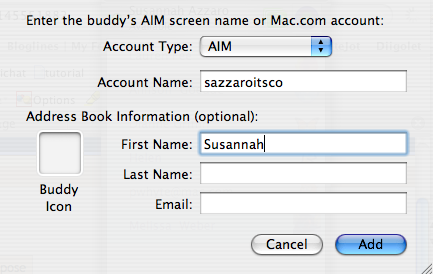
  4. In your drop-down menu items, choose Buddies-Add Buddy.
  5. Click New Person, and type in the information as it appears in the picture below.
  6. The final step is to send me an email with your Buddy Name, so I can add you as one of my buddies. Once we both add each other we will be set up to chat. You will know I'm online (and I will know you're online) if my name in your buddy list is no longer grayed-out.
  7. To initiate a chat if we're both online, just click on my name in your Buddy List and then click on the letter A at the very bottom of the Buddy List window.

Tuesday, November 14, 2006

Online Bookmark Managers

In prep for our next meeting, I thought I share a little blurb I wrote for our ENews about online bookmarking. It explains what these tools are and what they will do for you. The most comprehensive hotlist of online bookmark managers I've found is this one; (when you go to the page you will have to scroll down a bit to see the list.) I share it with you to show you how many of these tools are available to you. Also know that while I will be getting you set up with SiteJot on the 20th, if it ends up not working for you, you can try out another one.

Click on the picture below for the article: